Overview
What the calendar is and how events, rooms and approvals fit together
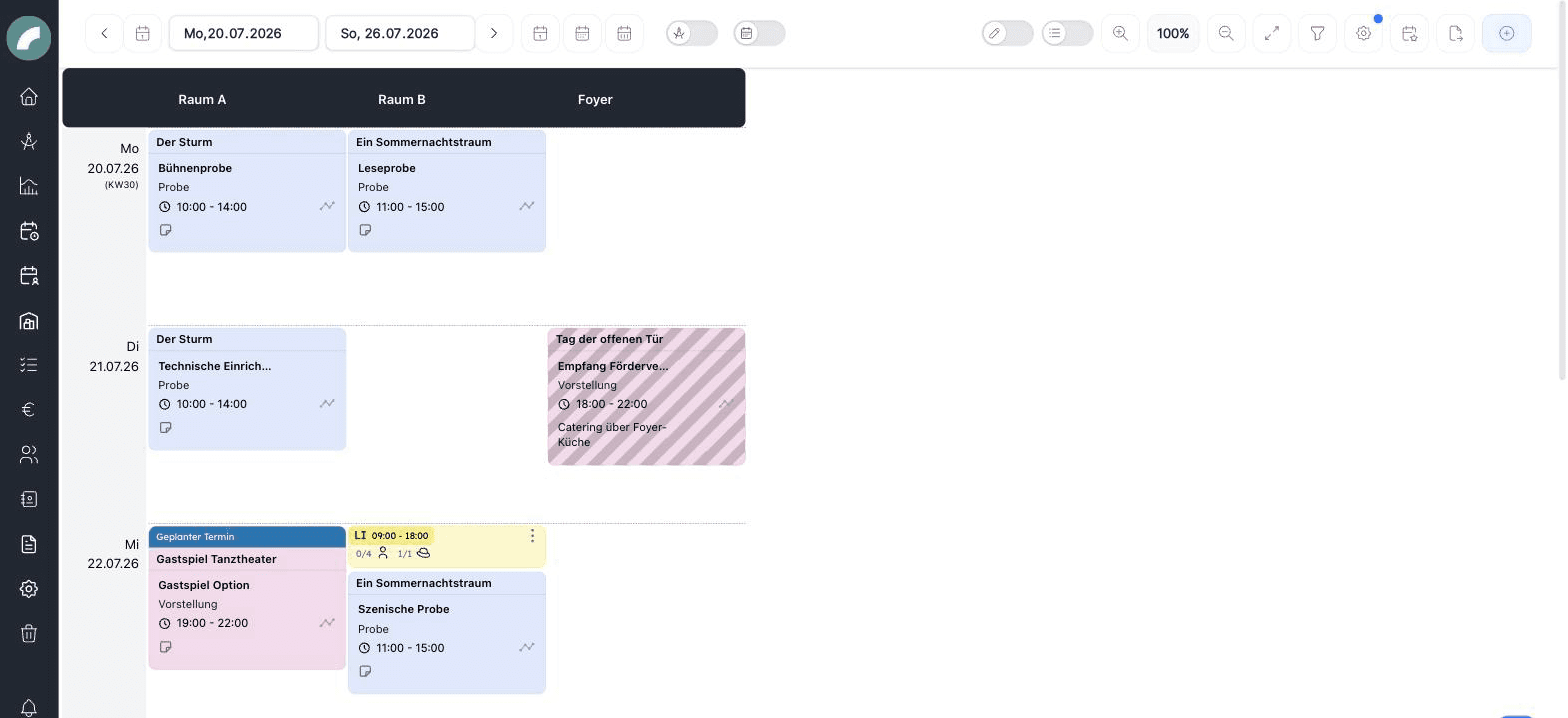
The calendar is Artwork's room occupancy and event planning module: performances, rehearsals, setups and teardowns, blockers — everything is planned as an event into a room. The grid shows days as rows and rooms as columns, so you see occupancy and free slots at a glance.
Core concepts
| Concept | What it means |
|---|---|
| Event | A calendar entry with an event type, a time range (or all-day), a room and an optional project. |
| Event type | The category of an event (e.g. performance, rehearsal, setup, blocker) with a color and abbreviation — configurable, including mandatory fields and a verification mode. |
| Event status | An optional add-on module: freely definable statuses (e.g. requested, confirmed) with a color — the calendar can color events by status. |
| Event properties | Configurable attributes such as with audience or loud, shown as icons on the event and available as filters. |
| Room booking request | Anyone who may not book a room directly submits a request — room admins accept or decline. |
| Planned event | An event in the planning calendar: provisional and invisible to regular users until it is confirmed. |
The "Calendar" menu
| Menu entry | Contents |
|---|---|
| Calendar | The event calendar — the main view |
| Planning calendar | The separate space for provisional planning |
| Event verifications | Incoming room booking and verification requests, plus your own sent requests |
The pages of this section
The Calendar View
Navigation, zoom, filters, display settings, daily view and multi-edit.
Creating Events
The event form: type, times, repetition, room, project, sub-events.
Rooms & Booking Access
Areas, room details, capacities, temporary rooms, administrators, and requests.
Event Verifications
Room booking requests and the approval workflow for events.
Planning Calendar
Plan provisionally without occupying the real calendar.
Exports & Calendar Subscription
PDF and Excel exports, personal ICS subscription.
Calendar Settings
Define the visible time window of daily view.
Event Settings
Configure event types, statuses, properties, holidays, defaults, and timeline presets.
Permissions
| Permission | Allows |
|---|---|
| Plan events with fixed booking (Termine fest planen) | Create events directly, without a booking request |
| Request room occupancies (Raumbelegungen anfragen) | Submit booking requests for rooms |
| Set up events when creating a project (Termine einrichten bei neuem Projekt) | Create events directly while creating a project |
| Define system settings for events (Systemeinstellungen für Termine definieren) | Manage the event settings |
| Room management (Raumverwaltung) | Create, edit and delete rooms |
| View and plan in the planning calendar (Planungskalender einsehen und Planen) | Use the planning calendar |
| Edit, delete and confirm planned events (Geplante Termine bearbeiten, löschen und bestätigen) | Manage planned events |
| Book firmly in the planning calendar (Im Planungskalender fest planen) | Book firmly in the planning calendar without a request |
In addition, every room grants its own rights: room admins (edit the room and approve occupancies) and users authorized to request — see Event Verifications.
From an idea to a published event
The calendar is also the starting point for project and staff planning. An event may determine a project's period, contain sub-events and a production timeline, and provide the context for shifts. Changes are immediately visible in the project and duty roster.
Three different approvals
A room booking request asks whether a room may be used. An event verification approves the content of a configured event type. A planned event is a provisional planning-calendar entry. One event may require more than one of these steps.