Planning Calendar
Plan provisionally without occupying the real calendar
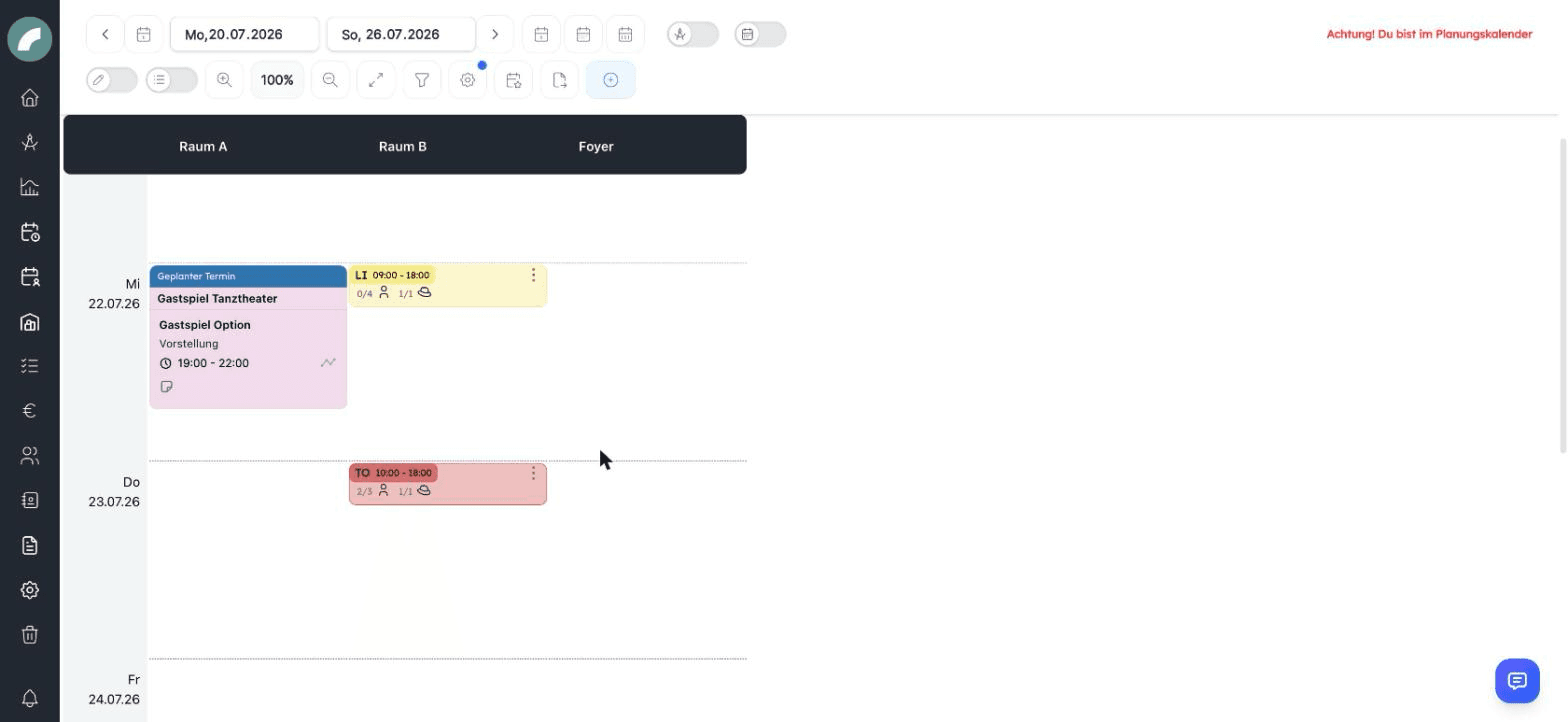
The planning calendar (Calendar → Planning calendar) is a separate space for provisional planning — for instance the season planning for next year. It looks like the normal calendar, but:
- Events here are planned events: they do not occupy rooms bindingly and are invisible to regular users until they are confirmed.
- A red warning "Attention! You are in the planning calendar" in the function bar prevents mix-ups.
- The planning calendar has its own filters and display options — saved filters of the normal calendar remain untouched. The option Show fixed events shows the real occupancies for orientation.
- Multi-edit can do the same as in the normal calendar: duplicate events into selected cells, create (individual) events in several cells at once, and move selected events into one cell — see Multi-edit.
From plan to real event
Plan. Anyone with View and plan in the planning calendar creates planned events here — same handling as in the event form.
Confirm. Users with Edit, delete and confirm planned events release the plan — individually or in bulk via multi-edit. The event then follows the usual path: where a room approval is required, a room booking request is sent to the room admins.
Become visible. With the confirmation, the event becomes a normal calendar entry. Conversely, an existing event can also be moved back into planning.
Seeing planned events in the normal calendar
Planners can show planned events in the normal calendar too, via the display option Show planned events — as dashed cards, clearly distinguished from fixed events. Projects whose project status is marked as a "planning status" also display their events this way.
Permissions
| Permission | Allows |
|---|---|
| View and plan in the planning calendar (Planungskalender einsehen und Planen) | Open the planning calendar and create planned events |
| Edit, delete and confirm planned events (Geplante Termine bearbeiten, löschen und bestätigen) | Manage planned events and turn them into real events |
| Book firmly in the planning calendar (Im Planungskalender fest planen) | Book firmly on confirmation, without a booking request |
Typical uses include season drafts, unconfirmed guest performances, and alternative room plans. Entries can already contain project, properties, description, and times without filling the binding calendar for all users.
Before confirmation, review room, event type, project, and times. Several planned events can be confirmed through multi-edit. Depending on room rights, they become firm events immediately or room booking requests.
Projects with a planning status
A project status can be marked centrally as a planning status. Events of such projects are treated as provisional even when created from the project, allowing a whole production to move between draft and binding planning.
Firm events as a reference
Show firm events overlays real bookings in the planning calendar. They remain reference data and cannot accidentally be confirmed as planned events. Use the overlay to test alternatives without overlooking existing occupancy.