Event Verifications
Room booking requests and the approval workflow for events
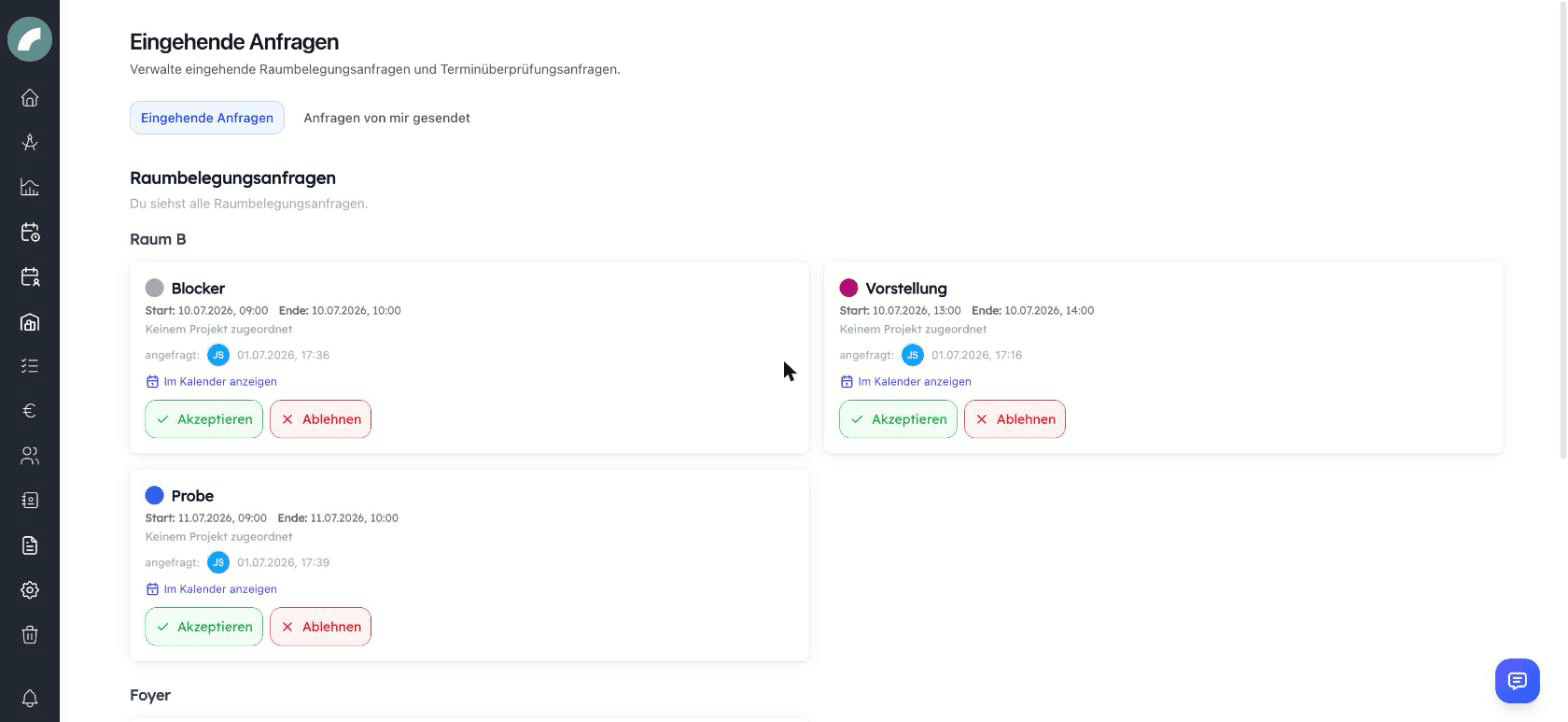
Not everyone may simply occupy every room — and some event types should always be reviewed before they count. Both cases come together under Calendar → Event verifications: the inbox for incoming requests and the overview Requests sent by me.
Who can book directly?
Whether an event takes effect immediately or has to be requested is decided per room:
- Rooms with "Can be firmly booked by anyone" are open to everyone.
- Otherwise, only the room's room admins book directly — as well as users with the global permission Plan events with fixed booking (Termine fest planen) and admins.
- Everyone else with Request room occupancies (or the per-room setting authorized to request) submits a room booking request: the save button of the event form becomes "Request occupancy" ("Belegung anfragen"), and the event appears hatched as requested in the calendar.
Room admins and users authorized to request are maintained per room under Room access (room management).
Handling room booking requests
Under Event verifications, room admins see the open requests for their rooms (admins and users with Plan events with fixed booking see all). For each request:
- Accept — the occupancy becomes firm; in the event dialog this is also possible as "Accept optionally" with a note.
- Decline — the request is rejected.
- Confirm occupancy with room change — accept, but in a different room (the original event remembers the declined room).
- A comment on the occupancy is sent to the requesting person as a notification.
Several requests can be accepted or declined at once via multi-edit.
The verification workflow for event types
Independently of rooms, every event type can have a verification mode:
| Mode | Meaning |
|---|---|
| No confirmation required | Events take effect immediately (default) |
| All assigned users must confirm | Every named reviewer must approve |
| At least one assigned user must confirm | One approval is enough |
| A specific user must confirm | Exactly the named person decides |
Events of such types (and events from the planning calendar) are submitted for verification — manually via "Request verification" on the event, or in bulk via multi-edit. Reviewers find them under Event verifications, grouped by event type, and approve or decline — a decline requires a reason, which goes back to the requesting person. Until the decision, the event counts as pending; a still-open request can be withdrawn.
Requests sent by me
The second section shows your own room booking requests and verification requests with their status (requested, pending, declined including the reason) — so you always know what is still awaiting a decision.
Conflicts
When you select a room in the event form, Artwork shows potential conflicts with existing events live. Accepting despite a conflict is possible — the responsibility lies with the room admins. The filters show free rooms and adjacent rooms help find alternative rooms.
Room booking and event verification answer different questions. Room admins decide whether a space may be used; reviewers assigned to an event type approve its content. An event may already have a room while still awaiting content approval.
An optional commitment reserves a room without treating the booking as fully final. Its option and comment remain visible. When an admin confirms another room, the originally declined room is retained as context.
For verification modes requiring all reviewers or at least one reviewer, the status shows which responses remain. Content approval does not replace an open room booking request.
A conflict warning is not an automatic rejection. It asks room admins and requesters to make a deliberate choice, considering sub-events, multi-day bookings, and adjacent rooms.
New requests and decisions appear in personal notifications, while My sent requests keeps their status, comments, and rejection reasons available after a notification has been read.